VIOFO Mini HK3 ACC Hardwire Cable For A119V3/A129 Duo/A129 Duo IR/A129 Plus Duo/A129 Pro Duo
Overview Review
VIOFO Mini HK3 ACC Hardwire Cable For A119V3/A129 Duo/A129 Duo IR/A129 Plus Duo/A129 Pro Duo - Viofo - official
VIOFO Type - C HK6 ACC Hardwire Kit for A329S Series, Support Hybrid Parking Mode, Automatic Voltage Display, Low Power Consumption - Viofo - official
1/8

VIOFO Mini HK3 ACC Hardwire Cable For A119V3/A129 Duo/A129 Duo IR/A129 Plus Duo/A129 Pro Duo

Sale price$25.99
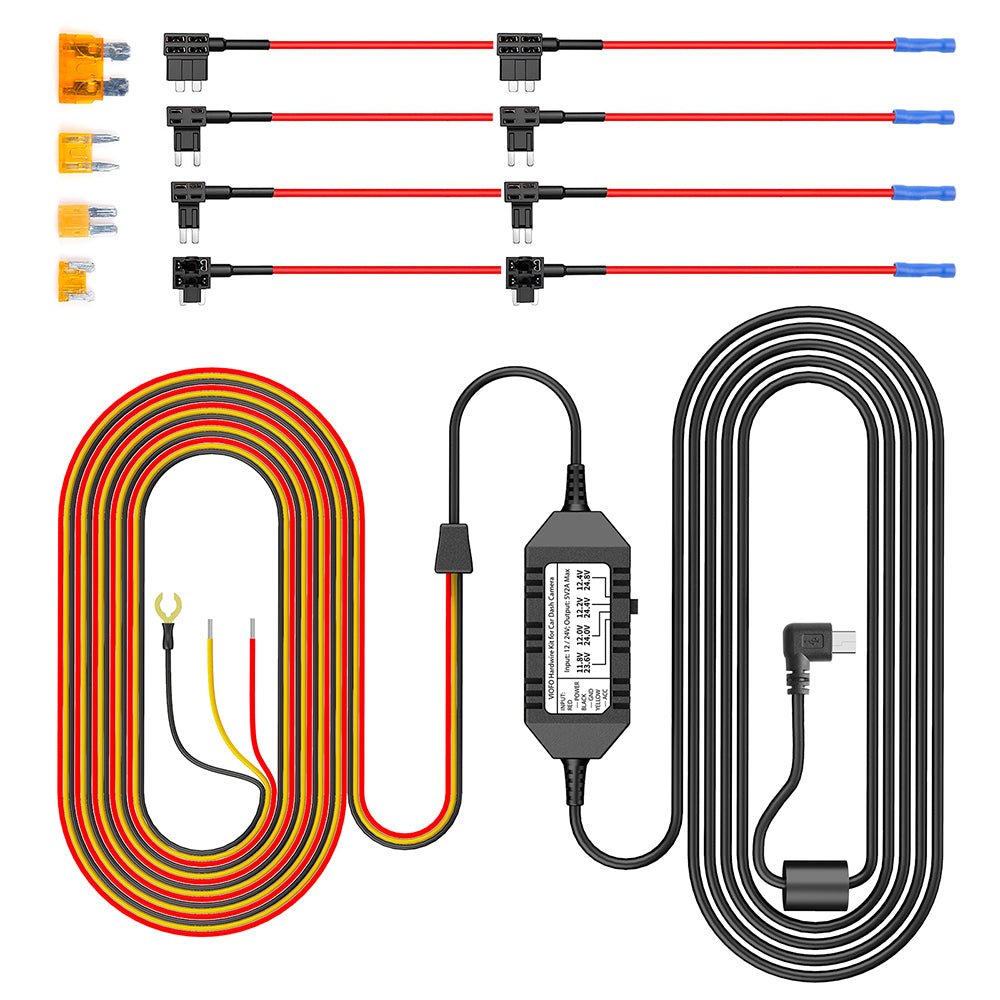
Fuse Type Options:8PCS Full Set Fuse
Quantity:
Subtotal
Sale price$25.99

Product Information

Dash Cams Comparisons

  • ${ item.name }
  • ${ value ? value: '-' }

Accessories

Video

Frequently Asked Questions

Reviews

Customer Reviews

Based on 3 reviews
67%
(2)
0%
(0)
0%
(0)
33%
(1)
0%
(0)
D
D.P.

Low voltage cutoff works great. Havent tested parking mode yet.

A
Alistair Delva
Great kit with lots of options

If like me you needed to tap multiple fuse sizes and also weren't sure what fuse types they were, the kit with all the fuse holders and fuses for just a few dollars more makes the installation process easy.

F
Frank

DIDNT LIKE THAT THE PACKER SQUISHED THE FUSE HOLDER WIRE 2 PACK INTO THE KIT BOX, KINKING THE WIRE AND BENDING CONNECTION WHER IT IS WIRED TO FUSE INSERT PORTION. NOT HAPPY WITH THAT AT ALL.

Why Use a Hardwire Kit?

2.jpg__PID:5aff87c3-e3ed-4535-bac5-44a3c7e76009

The hardwire kit provides continuous power to your dash cam via the fuse box (VCC, ACC, GND), replacing the need for a cigarette lighter and ensuring seamless coverage from the moment you start driving.

2-1.jpg__PID:ff87c3e3-ed35-45ba-8544-a3c7e7600955

Even when parked, the hardwire kit keeps your dash cam running by tapping into your vehicle's fuse box. It captures every important moment and automatically powers down before draining your car battery.

Seamless Parking Mode Switching

With ACC detection, the dash cam seamlessly enters parking mode when the vehicle's engine is turned off and resumes normal recording once the vehicle is started.

HK3_03.jpg__PID:0793cee7-bfdb-4f83-97b9-debcd1c0452d

Battery Discharge Prevention

The HK3 Hardwire Cable provides continuous power to your dashcam in parking mode until your car battery voltage drops to the configured threshold.

Configurable Voltage Cut-off

VIOFO HK3 Hardwire Cable offers 4 voltage cut-off options. When the vehicle's battery voltage drops to the selected threshold, the HK3 stops supplying power to the dashcam, helping prevent battery discharge.

HK3_10.jpg__PID:37f01f93-8441-4549-9691-b01158487e35

12V / 24V Compatible

The HK3 Hardwire Cable connects the camera directly to cars, trucks, buses, SUVs, or big rigs for continuous power. It accepts voltage from any vehicle running on 12–24V.

1_59.jpg__PID:b2bdcf25-3ecc-4250-a6f4-d4e70c6bbb06
HK3_06.jpg__PID:5d39a211-d62c-498d-801a-9e12c4324ca5
6.jpg__PID:ed3535ba-c544-43c7-a760-09557d40c5f7

Tools Required

1. Multimeter
2. Needle-nose pliers
3. Fuse puller
4. Trim removal tool

6-1.jpg__PID:3535bac5-44a3-47e7-a009-557d40c5f7f7

1. Locate Your Fuse Box

Fuse box locations and types can differ between car models, years, and variants. Refer to the car manual for specific instructions.

6-2.jpg__PID:35bac544-a3c7-4760-8955-7d40c5f7f7e1

2. Identify Battery & ACC fuses

To check fuse locations, use a multimeter on DC voltage after turning off the vehicle. 12V or 24V indicates Battery location, while 0V indicates ACC location.

6-3.jpg__PID:bac544a3-c7e7-4009-957d-40c5f7f7e1b8

3. Recheck the Fuses

With the ignition turned on, use the multimeter to test the Battery and ACC fuse positions identified in Step 2. Both should show a voltage of approximately 12V or 24V. If not, repeat Step 2.

6.jpg__PID:ed3535ba-c544-43c7-a760-09557d40c5f7

Tools Required

1. Multimeter
2. Needle-nose pliers
3. Fuse puller
4. Trim removal tool

6-1.jpg__PID:3535bac5-44a3-47e7-a009-557d40c5f7f7

1. Locate Your Fuse Box

Fuse box locations and types can differ between car models, years, and variants. Refer to the car manual for specific instructions.

6-2.jpg__PID:35bac544-a3c7-4760-8955-7d40c5f7f7e1

2. Identify Battery & ACC fuses

To check fuse locations, use a multimeter on DC voltage after turning off the vehicle. 12V or 24V indicates Battery location, while 0V indicates ACC location.

6-3.jpg__PID:bac544a3-c7e7-4009-957d-40c5f7f7e1b8

3. Recheck the Fuses

With the ignition turned on, use the multimeter to test the Battery and ACC fuse positions identified in Step 2. Both should show a voltage of approximately 12V or 24V. If not, repeat Step 2.

6-4.jpg__PID:c544a3c7-e760-4955-bd40-c5f7f7e1b86a

4. Remove the Selected Fuses

Use a fuse puller to remove the fuses from the previously identified Battery and ACC positions.

6-5.jpg__PID:44a3c7e7-6009-457d-80c5-f7f7e1b86abe

5. Insert the Removed Fuses

Check the type of the removed fuses and confirm the correct fuse model. Then insert each fuse into the corresponding fuse tap.

6-6.jpg__PID:a3c7e760-0955-4d40-85f7-f7e1b86abe35

6. Connect the Fuse Tap

Insert the metal strands of the hardwire cable into the metal tube of the fuse tap, then use needle-nose pliers to crimp the metal tube tightly.

6-8.jpg__PID:c7e76009-557d-40c5-b7f7-e1b86abe35a3

7. Install the Fuse Tap

Insert the fuse tap back into the fuse box and secure it properly to ensure a stable connection.

6-4.jpg__PID:c544a3c7-e760-4955-bd40-c5f7f7e1b86a

4. Remove the Selected Fuses

Use a fuse puller to remove the fuses from the previously identified Battery and ACC positions.

6-5.jpg__PID:44a3c7e7-6009-457d-80c5-f7f7e1b86abe

5. Insert the Removed Fuses

Check the type of the removed fuses and confirm the correct fuse model. Then insert each fuse into the corresponding fuse tap.

6-6.jpg__PID:a3c7e760-0955-4d40-85f7-f7e1b86abe35

6. Connect the Fuse Tap

Insert the metal strands of the hardwire cable into the metal tube of the fuse tap, then use needle-nose pliers to crimp the metal tube tightly.

6-8.jpg__PID:c7e76009-557d-40c5-b7f7-e1b86abe35a3

7. Install the Fuse Tap

Insert the fuse tap back into the fuse box and secure it properly to ensure a stable connection.

6-9.jpg__PID:e7600955-7d40-45f7-b7e1-b86abe35a364

8. Install the Ground Wire (Black)

Select a metal screw near the fuse box, loosen the screw, insert the Ground wire's metal terminal under the screw, and then tighten the screw securely.

6-10.jpg__PID:6009557d-40c5-47f7-a1b8-6abe35a364a6

9. Connect the Hardwire Cable

Connect the hardwire cable's Type-C plug into the power port on the top of the dashcam's GPS mount.

6-11.jpg__PID:09557d40-c5f7-47e1-b86a-be35a364a677

10. Test the Dash Cam

Start the vehicle to power on the dashcam. Enter the dashcam settings menu and enable Parking Mode. The parking mode icon will appear at the position on the left side of the screen.

6-12.jpg__PID:557d40c5-f7f7-41b8-aabe-35a364a677e6

11. Conceal the Wiring

Finally, follow the recommended wiring shown in the diagram below and use the trim removal tool to hide the hardwire cable.

6-9.jpg__PID:e7600955-7d40-45f7-b7e1-b86abe35a364

8. Install the Ground Wire (Black)

Select a metal screw near the fuse box, loosen the screw, insert the Ground wire's metal terminal under the screw, and then tighten the screw securely.

6-10.jpg__PID:6009557d-40c5-47f7-a1b8-6abe35a364a6

9. Connect the Hardwire Cable

Connect the hardwire cable's Type-C plug into the power port on the top of the dashcam's GPS mount.

6-11.jpg__PID:09557d40-c5f7-47e1-b86a-be35a364a677

10. Test the Dash Cam

Start the vehicle to power on the dashcam. Enter the dashcam settings menu and enable Parking Mode. The parking mode icon will appear at the position on the left side of the screen.

6-12.jpg__PID:557d40c5-f7f7-41b8-aabe-35a364a677e6

11. Conceal the Wiring

Finally, follow the recommended wiring shown in the diagram below and use the trim removal tool to hide the hardwire cable.

6.jpg__PID:ed3535ba-c544-43c7-a760-09557d40c5f7

Tools Required

1. Multimeter
2. Needle-nose pliers
3. Fuse puller
4. Trim removal tool

6-1.jpg__PID:3535bac5-44a3-47e7-a009-557d40c5f7f7

1. Locate Your Fuse Box

Fuse box locations and types can differ between car models, years, and variants. Refer to the car manual for specific instructions.

6-2.jpg__PID:35bac544-a3c7-4760-8955-7d40c5f7f7e1

2. Identify Battery & ACC fuses

To check fuse locations, use a multimeter on DC voltage after turning off the vehicle. 12V or 24V indicates Battery location, while 0V indicates ACC location.

6-3.jpg__PID:bac544a3-c7e7-4009-957d-40c5f7f7e1b8

3. Recheck the Fuses

With the ignition turned on, use the multimeter to test the Battery and ACC fuse positions identified in Step 2. Both should show a voltage of approximately 12V or 24V. If not, repeat Step 2.

6-4.jpg__PID:c544a3c7-e760-4955-bd40-c5f7f7e1b86a

4. Remove the Selected Fuses

Use a fuse puller to remove the fuses from the previously identified Battery and ACC positions.

6-5.jpg__PID:44a3c7e7-6009-457d-80c5-f7f7e1b86abe

5. Insert the Removed Fuses

Check the type of the removed fuses and confirm the correct fuse model. Then insert each fuse into the corresponding fuse tap.

6-6.jpg__PID:a3c7e760-0955-4d40-85f7-f7e1b86abe35

6. Connect the Fuse Tap

Insert the metal strands of the hardwire cable into the metal tube of the fuse tap, then use needle-nose pliers to crimp the metal tube tightly.

6-8.jpg__PID:c7e76009-557d-40c5-b7f7-e1b86abe35a3

7. Install the Fuse Tap

Insert the fuse tap back into the fuse box and secure it properly to ensure a stable connection.

6-9.jpg__PID:e7600955-7d40-45f7-b7e1-b86abe35a364

8. Install the Ground Wire (Black)

Select a metal screw near the fuse box, loosen the screw, insert the Ground wire's metal terminal under the screw, and then tighten the screw securely.

HK3_11.jpg__PID:93cee7bf-db9f-4397-b9de-bcd1c0452d34

9. Connect the Hardwire Cable

Connect the hardwire cable's Type-C plug into the power port on the top of the dashcam's GPS mount.

6-11.jpg__PID:09557d40-c5f7-47e1-b86a-be35a364a677

10. Test the Dash Cam

Start the vehicle to power on the dashcam. Enter the dashcam settings menu and enable Parking Mode. The parking mode icon will appear at the position on the left side of the screen.

6-12.jpg__PID:557d40c5-f7f7-41b8-aabe-35a364a677e6

11. Conceal the Wiring

Finally, follow the recommended wiring shown in the diagram below and use the trim removal tool to hide the hardwire cable.

Cable Connection

The HK6 features an always-on Bluetooth broadcast that transmits the car battery voltage—no pairing or user interaction required. Your dashcam automatically searches for the HK6's signal, reads the voltage, and displays it on the recorded video for real-time monitoring.

*Currently supports: A229 Ultra, A119 M Pro, A329S Series. App support for additional models is on the way!

HK3_15.jpg__PID:678dbd98-fe08-46c3-9ea9-b2ec67032bf2

Product Diagram

HK3_17.jpg__PID:e7bfdb9f-8397-49de-bcd1-c0452d340473